Product Updates

Follow new updates and improvements to ecosio.

Management API Changelog v1.4.0
Release summary

This release adds e-invoicing scenarios for France and the United Kingdom. It also introduces OAuth2 authentication as the recommended authentication method for Management API integrations.


🌍 New country scenarios

Partners can now activate two additional country scenarios through the Management API:

  • 🇫🇷 France

  • 🇬🇧 United Kingdom

These scenarios provide the country-specific configuration required for customer onboarding and reduce manual setup.

Endpoint

POST /api/v1/management/companies/{companyUuid}/scenarios

🇫🇷 France example

{ 
"name": "FRANCE_EINVOICE", 
"peppolParticipantIds": ["9957:FRxxxxxxxxx"], 
"emailAddressesForValidationErrors": ["user@company.com"], 
"siret": "xxxxxxxxxxxxxx", 
"siren": "xxxxxxxxx", 
"paAuthorisationContract": true, 
"direction": "BOTH", 
"selfBilling": false 
} 

🇬🇧 United Kingdom example

{ 
"name": "UNITED_KINGDOM_EINVOICE", 
"peppolParticipantIds": ["9932:GBXXXXXXXXX"], 
"emailAddressesForValidationErrors": ["user@company.com"], 
"direction": "BOTH" 
} 

🔐 OAuth2 authentication

The Management API now supports the OAuth2 client credentials flow. OAuth2 is the recommended authentication method for new integrations.

The required credentials are:

  • Client ID

  • Client Secret

  • App key, which remains unchanged and is still required with OAuth2

Authentication options in Monitor

Monitor now provides both authentication methods for Management API connectors:

  • Basic Authentication, which still requires IP whitelisting

  • OAuth2 client credentials, which does not require IP whitelisting

The OAuth2 credentials are available below the connector information in Monitor. Select the option to generate your new Client ID and Client Secret. Copy the Client Secret when it is generated and store it in an approved credential manager, as it is hidden afterwards.


⚠️Migration period

Both authentication methods are currently available. Basic Authentication is marked for deprecation, but no removal date has been announced. Existing integrations can continue to use Basic Authentication during the migration period. OAuth2 is recommended because it removes the need for IP whitelisting.


✅ Recommended action

  • Use OAuth2 for new integrations

  • Plan the migration of existing integrations from Basic Authentication to OAuth2

  • Keep the existing app key in every request

🔭 Next up

We are preparing additional country features for:

  • 🇸🇰 Slovakia

  • 🇭🇷 Croatia

  • 🇦🇪 United Arab Emirates (UAE)

  • 🇩🇪 Germany e-mail scenario

The ecosio Product team
ecosio supports e-invoicing in Saudi Arabia: here’s what you need to know

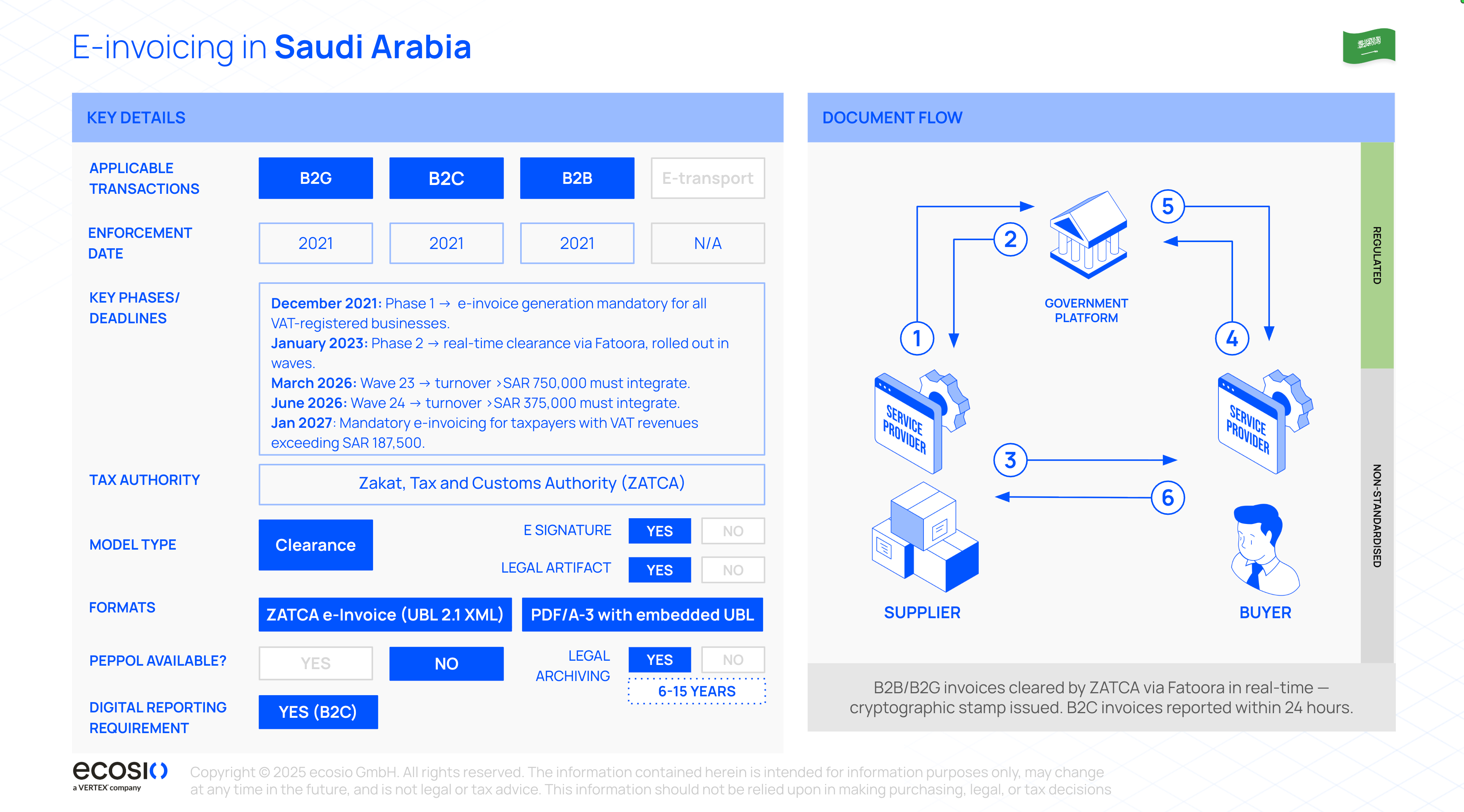
Saudi Arabia is the largest economy in the Middle East and a strategic gateway to the wider Arabic region. It also operates one of the world's most mature and tightly controlled e-invoicing frameworks: for taxpayers brought into Phase 2, standard invoices must be cleared by ZATCA before they are issued to the buyer. This mix of commercial opportunity and technically demanding compliance makes a single-platform approach valuable for companies operating or expanding in the country.

What you must know about Saudi Arabia

Scope and model

The mandate applies to resident VAT-registered taxable persons and parties issuing invoices on their behalf across B2B, B2G and B2C. Standard invoices require real-time clearance; simplified invoices are reported within 24 hours. Phase 2 applies in taxpayer waves.

Phased rollout

December 2021: Phase 1 introduced mandatory electronic invoice generation and storage.

January 2023: Phase 2 introduced API integration, rolling out in waves based on ZATCA's taxpayer criteria.

Formats

ZATCA clearance and reporting submissions use UBL 2.1 XML based on the KSA CIUS. A PDF/A-3 representation with embedded XML can be provided to buyers.

Security and QR codes

Simplified documents are cryptographically stamped by the taxpayer's EGS before reporting. Standard documents are validated and stamped by ZATCA during clearance. The applicable QR code is included in the buyer-facing invoice.

Corrections

ZATCA may accept, accept with warnings or reject a submitted document. Rejected documents must be corrected and resubmitted according to ZATCA's rules. Once issued, invoices must not be altered; corrections are made using credit and debit notes.

Cross-border

Exports: generally cleared as standard invoices where the Saudi supplier is subject to Phase 2. Imports: foreign-supplier invoices are generally outside Fatoora issuance; import VAT or reverse-charge requirements may apply. Self-billing is not automatic and requires a qualifying approved arrangement.

Inbound invoices

Invoices are delivered directly from supplier to buyer; ZATCA does not provide an invoice retrieval API for buyers. Buyers must retain appropriate invoice evidence in accordance with the applicable requirements.

Peppol

Not used. Regulatory clearance and reporting take place through ZATCA's APIs, while suppliers remain responsible for delivering invoices to buyers.

Archiving

Invoices must generally be retained electronically for at least six years, remain accessible and preserve the relevant integrity and audit information. Storage must comply with applicable Saudi VAT, cloud-hosting and data-residency requirements.

Penalties

Non-compliance may result in warnings, financial penalties or other enforcement action, depending on the nature and recurrence of the violation.

Saudi Arabia (KSA) Mandate Overview

Timeline

  • Our Saudi Arabia solution is currently fully available since September 2026

How we can help with a managed compliance service

For large organisations, the challenge in Saudi Arabia is running clearance and reporting reliably at volume, integrating those processes with existing systems, and keeping pace with ZATCA's technical and schema updates.

With ecosio's managed compliance service for e-invoicing, we help teams:

  • Connect through a single gateway to ZATCA's Clearance and Reporting APIs, with submission visibility in ecosio Monitor.

  • Map and transform ERP data into ZATCA-compliant UBL 2.1 XML and validate documents before submission to help reduce rejections.

  • Route each document through the correct process: clearance for standard invoices and reporting within 24 hours for simplified invoices.

  • Produce a buyer-facing PDF/A-3 representation with embedded XML and the applicable QR code for onward delivery.

  • Integrate the Saudi e-invoicing process with existing business systems, including SAP, Oracle and Microsoft Dynamics environments.

  • Provide the final invoice artefacts needed for onward delivery and retention. Saudi invoice records must generally be retained for at least six years, subject to the applicable storage and data-residency requirements.

Want to know more about Saudi Arabia? Take a deeper look in our country profile page, where our FAQ answers the questions customers ask most often. And if you are ready to discuss how ecosio can support your business case in Saudi Arabia and many other countries, get in touch today!

The ecosio Product team

Public

Investigate, reconcile and bill faster: latest Monitor updates

Monitor just got four upgrades that make self-service investigation, reconciliation and billing quicker and more precise. You can now follow how messages connect, break Statistics down by identifier, and filter both Statistics and the Message Overview to an exact time.

Why this matters

High message volumes, multi-entity billing and time-critical support all create the same problem: the answer is somewhere in Monitor, but it takes too long to reach. Reconciling billing by subsidiary often meant exporting to Excel, and tracing one message could mean scrolling through a whole day of traffic. These four updates put the connections, identifiers and exact time windows you need right where you're already working.

What's new

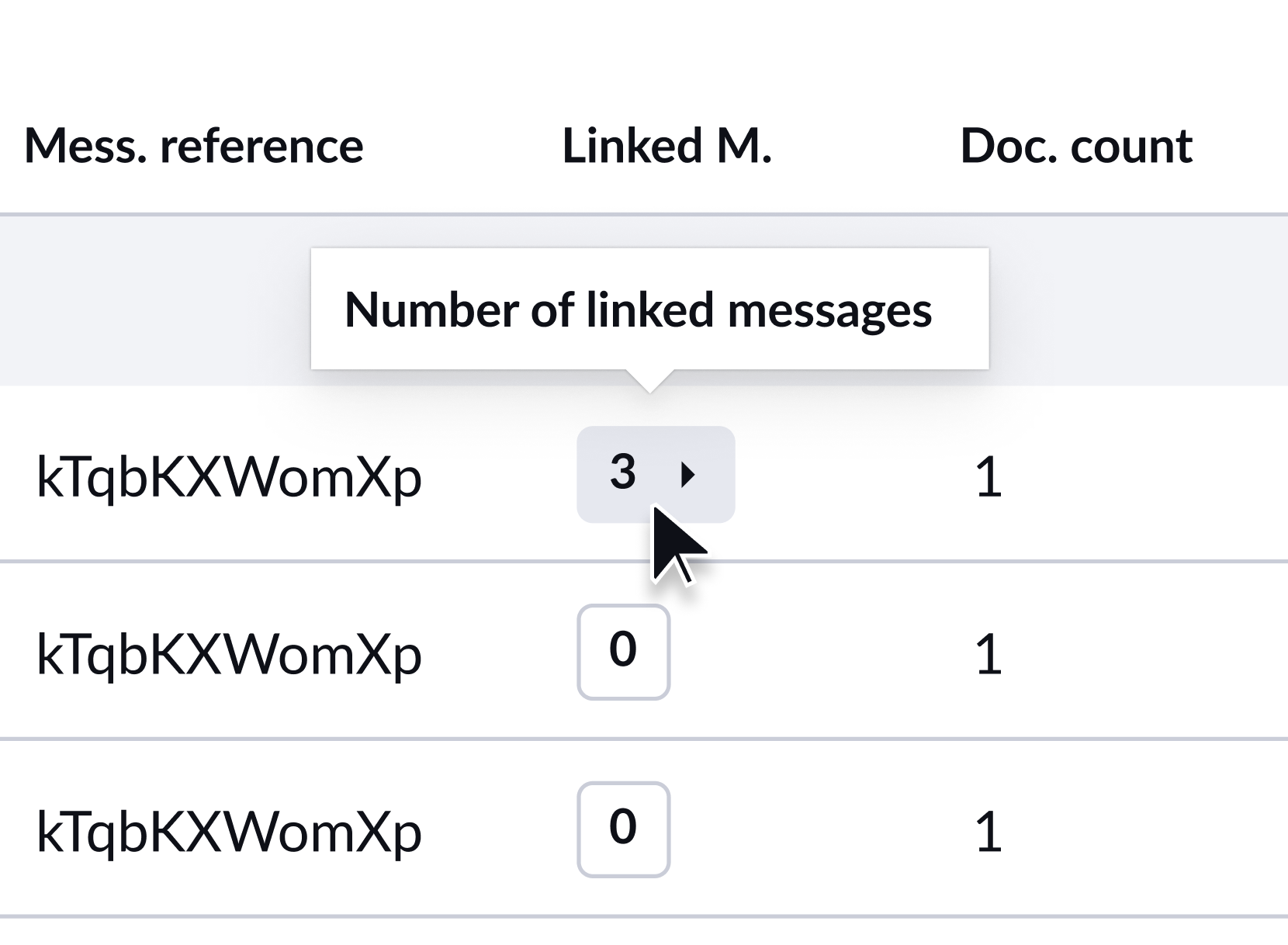
Follow the full story of a message - Linked messages on the Message Overview

Tracing how a message related to others, its duplications, splits, merges, partner switches, used to mean manual searching with no way to see or jump between the links. Now the Message Overview surfaces those connections for you, so an investigation that once spanned several screens happens in a couple of clicks. This one came straight from customer requests.

  • Spot connected messages instantly with a linked-messages count, shown up to 99+

  • Jump straight to the message you need, previewing up to five references on hover or opening the full list

  • Trust what you're looking at, with each reference tied to the ecosio Message ID and a tooltip to explain it

Break billing down by your own identifier - GLN and identifier filter on Statistics

Multi-entity customers could only split billing data by partner, not by their own identifiers, so reconciling by subsidiary usually ended up in Excel. Now you can filter Statistics by a single identifier such as GLN, Peppol participant ID or customer number, so your billing view lines up with how your business is actually structured. It's one of our most-requested Statistics improvements.

  • Reconcile by subsidiary, not just by partner, filtering by one identifier per query

  • Find the right identifier fast with free text or the alias dropdown, plus a tooltip showing what's searchable

  • Hand over clean numbers, with filtered report downloads matching your selection

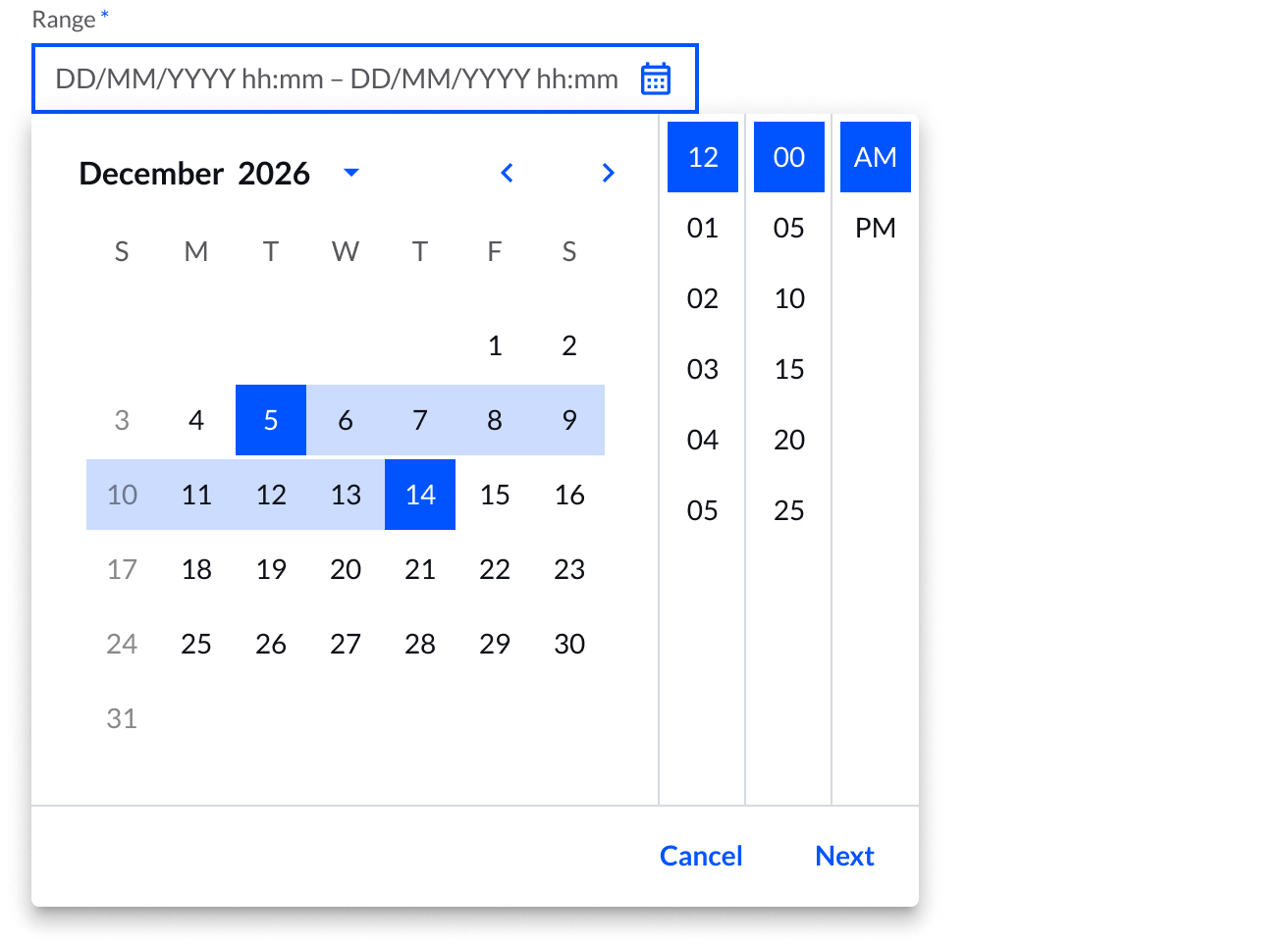
Validate billable volumes to the exact hour - Date and time picker on Statistics billable messages

Statistics could only be filtered by preset ranges like this week, so checking billable volumes around a specific event, such as a go-live or a sudden spike, wasn't possible. Now you can narrow billable message statistics to an exact date and hour range and carry that straight into your export, so the numbers are easy to validate and defend.

  • Check volumes around a specific event by picking an exact date and hour range

  • Match the source data, with filtering by full hours in line with how billable data is stored

  • Back up the figures, with your selection included in the CSV export

Pinpoint the exact time - Time picker on the Message Overview

Filtering the Message Overview by date alone meant paging through everything that happened that day to find a single message. Now you can filter to an exact time, down to the minute, so a time-critical investigation takes seconds instead of a scroll through hours of traffic. This came straight from your feedback.

  • Find the exact moment an issue happened, setting start and end times down to the minute

  • Cut investigation time from a full-day scroll to a few seconds

  • Keep the detail, with your selection included in CSV downloads

Technical notes

  • Some features depend on customer configuration, permissions or rollout status, so availability may vary by company and user

  • Linked messages show a count up to 99+, with up to five references on hover and the full list in the modal

  • The Statistics identifier filter works one identifier at a time

  • The Statistics date and time picker works by full hours, while the Message Overview time picker goes down to the minute

  • Linked message references use the internal ecosio Message ID, not your own message reference

Take a look in Monitor and tell us what you think🔥

The ecosio Product team

Earlier updates